Skip to content
Cue Design System

Brand

The sphere, the mark, and the system drawn around them — colour, type, space, gradient and glass, the product icon families, the surface states, the photography direction and the “Run it.” campaign. Every value on this page paints itself from the token it documents.

01 — The idea
Cue · Guidelines, y 122–500

Organic on the outside. Digital at the core.

The sphere is the visual embodiment of the Superintelligence. It represents a self-contained, autonomous system, complete in itself and capable of operating across complex environments. Its form expresses a dual nature.

The outer surface is fluid and natural, evoking intuition, awareness, and adaptability. It behaves like liquid, reacting softly to its environment. This layer represents the human dimension of intelligence — the ability to perceive, interpret, and respond.

At its core, a structured digital system emerges. Ordered particles, light patterns, and internal geometry suggest processing, computation, and precision. This inner structure represents the machine intelligence powering the system.

Together, these two layers form a unified object. A system that combines human awareness and flexibility with digital speed and scale.
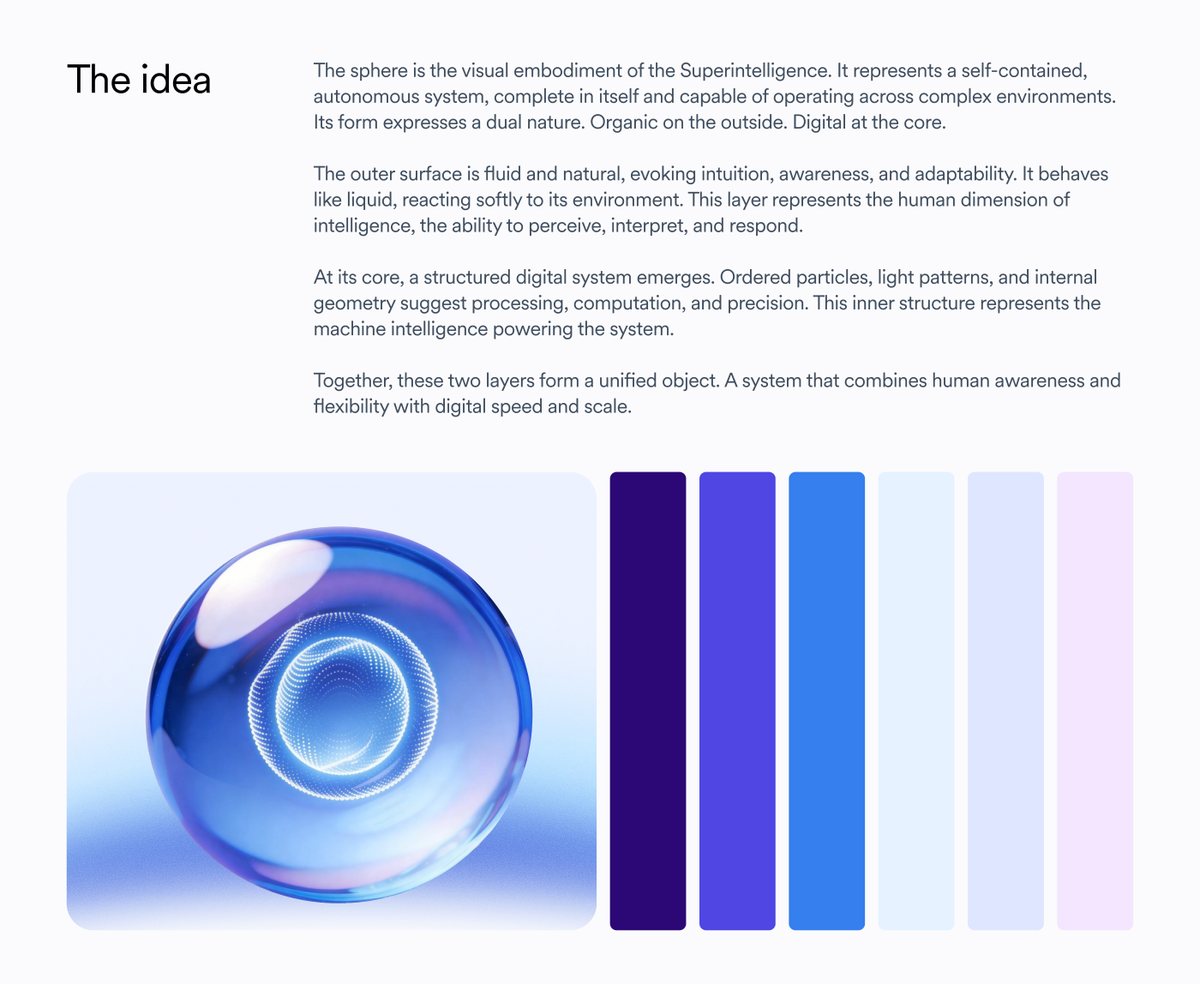
The idea, as set out on the Cue Guidelines board: the glass sphere beside its colour column
The board’s own opening frame. The sphere sits beside the colour column it is drawn from — indigo through electric blue to the two palest tints and a single violet.
Visual language — what has to be true of any new sphere render
Sphere (The Intelligence)
Surface: transparent liquid glass, strong refraction and soft iridescent highlights. Interior: luminous particle core made of concentric dotted waves or vortex. Always calm and stable, never aggressive or mechanical.
Background (Intelligence Field)
Represents the environment the intelligence operates in. Deep electric blue to indigo gradient space. Subtle liquid ripples or wave distortions radiating from the sphere.
Typography
CircularXX Body, large editorial scale, bold for the tagline “Run it”, left aligned. White over a contrasted blue background. Readability first.
Brand presence
Fountain logo small, quiet, anchored at the bottom.
02 — The mark
css/base.css · .fx-orb

The mark is an object, not a logo

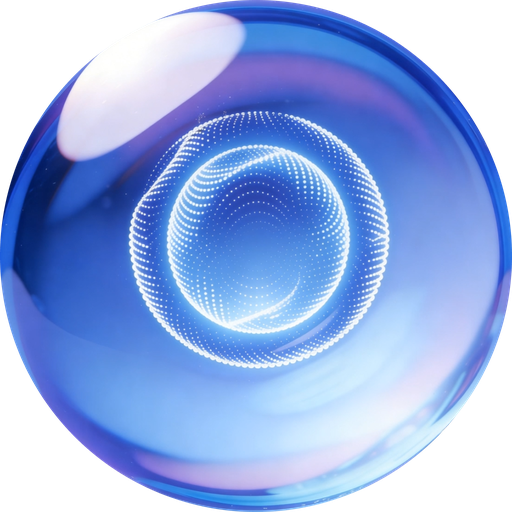
The Cue mark is a rendered glass sphere on transparent alpha. Everything that goes wrong with it comes from treating it as flat artwork: putting it in a box, giving it a background, clipping it to a circle it already is, or dropping it onto a surface with no light around it. One primitive prevents all four.
.fx-orb--xs20px
.fx-orb--sm32px
.fx-orb--md64px
.fx-orb--lg120px
.fx-orb--xl240px

Five sizes. The bloom lives outside the mark’s own box, so a parent with overflow: hidden will cut it — give the parent room rather than shrinking the orb.

<span class="fx-orb fx-orb--md"><img src="assets/brand/cue-orb.png" alt="Cue"></span>

Three files, and only three: cue-orb.png (512, general use), cue-orb-lg.png (1016, hero), cue-orb-icon.png (128, buttons and chips). The older washed-out renders in the two in-house systems are superseded — don’t reach for them.

Right — on light

Free-standing on a near-white ground, carrying its bloom. The halo is what makes it read as lit glass rather than a printed circle.

Right — on the field

On a dark or already-glowing surface the halo doubles up into a grey smudge. Add .fx-orb--flat; the field itself supplies the light.

Wrong — boxed

A grey plate and a radius of its own. The transparent alpha is doing nothing and the sphere has been demoted to an app icon, level with the products it runs.

Wrong — bloom clipped

A parent with overflow: hidden cuts the halo into a hard square edge. Give the parent room; never shrink the orb to make the halo fit.

Wrong — no halo

.fx-orb--flat on a light ground. Correct on a dark field, wrong here: with nothing lighting it, the sphere sits flat on the page like a sticker.

03 — Colour
css/tokens.css

Indigo carries the brand. Blue carries the product.

Two families do the brand work — an indigo that signals the AI itself, and a deep electric blue that is the Intelligence Field the sphere lives in. Everything else is a near-white ground, a grey for type, or a semantic accent used once and sparingly.

Brand — the indigo the AI affordances use
--brand-50
#eef2ff
--brand-100
#e0e7ff
--brand-600
#4f46e5
--brand-800
#3730a3
Blue — the product and Intelligence Field family
--blue-50
#e7f3ff
--blue-500
#54a4f3
--blue-600
#357fef
--blue-800
#0c4497
Neutrals — grounds and type
--neutral-white
#ffffff
--neutral-50
#f8fafc
--neutral-100
#f1f5f9
--neutral-200
#e2e8f0
--neutral-300
#b7c0cb
--neutral-400
#687281
--neutral-600
#404d5f
--neutral-900
#0f172a
--black
#000000
Semantic accents — 50 / 600 / 800 triads: tint, mark, text
--green-*
50
#d8f9d3
600
#4ea441
800
#145b2f
--amber-*
50
#fff8e1
600
#f68006
800
#92400e
--lemon-*
50
#fffee1
600
#ffcf23
800
#664f00
--rose-*
50
#fff1f2
600
#e11d48
800
#9f1239
--purple-*
50
#f4e6ff
600
#a738ff
800
#5b00a3
--teal-*
50
#e3fafa
600
#39d4d6

Each triad is a fixed set of three: the 50 is the tint you fill a badge with, the 600 is the mark or the dot, the 800 is text that has to hold on the 50. Teal ships without an 800 — if you need dark teal type, use --neutral-900.

04 — Typography
Set here in the live token

One face, twelve steps, editorial scale

The brand typeface is CircularXX (Lineto, commercial). This site — and every page built from these tokens — sets Plus Jakarta Sans as the deliberate stand-in, self-hosted so the library renders identically offline and in print. The scale, the line heights and the tracking below are the real values; only the face is substituted.

--h172px · 700
--lh-display 1
--track-display -.03em
Run it.
--h256px · 700
--lh-display 1
--track-display -.03em
Let’s run it!
--h348px · 700
--lh-tight 1.1
--track-tight -.02em
Humans in motion.
--h440px · 700
--lh-tight 1.1
--track-tight -.02em
System in control.
--h4-sm32px · 700
--lh-tight 1.1
--track-tight -.02em
A contractor dropped. The schedule held.
--h526px · 700
--lh-snug 1.3
0
The sphere is the visual embodiment of the Superintelligence.
--h622px · 700
--lh-body 1.4
0
Organic on the outside. Digital at the core.
--text-xl22px · 400
--lh-body 1.4
0
Say the word. I’ll make it happen.
--text-l18px · 400
--lh-body 1.4
0
The outer surface is fluid and natural, evoking intuition, awareness, and adaptability.
--text-m16px · 400
--lh-body 1.4
0
At its core, a structured digital system emerges. Ordered particles, light patterns, and internal geometry.
--text-s14px · 400
--lh-snug 1.3
0
Documentary moment: mid-conversation, natural expression, never posed.
--text-xs12px · 400
--lh-snug 1.3
0
HR Superintelligence

Headings are 700 and negatively tracked; body is 400 and untracked. Many nodes in the Figma frame resolve H4 to 32px rather than the published 40 — that is --h4-sm, an opt-in, not a change to --h4.

05 — Space, radii, elevation
css/tokens.css

A 4px spine, three radii, and light instead of shadow

Spacing is a 4px scale that loosens as it grows. The frame itself is fixed: 1440 wide, 80px side margins, a 1280 container, 64px top and bottom. Elevation is the interesting one — Fountain almost never uses a grey drop shadow on white. Borders are inset rings, and lift is a wide blue-grey glow.

Spacing
--space-0
0px
--space-05
2px
--space-1
4px
--space-2
8px
--space-3
12px
--space-4
16px
--space-5
20px
--space-6
24px
--space-8
32px
--space-10
40px
--space-12
48px
--space-14
56px
--space-16
64px
--space-20
80px
Layout
--frame-width
1440px — the Figma artboard every section was drawn on.
--container-large
1280px — the content column inside that frame.
--margin-lr
80px — side margin. --margin-tb is 64px.
--section-pad
80px, or 48px for --section-pad-small.
--max-width-large
768px — the widest a paragraph is allowed to run.
--max-width-xsmall
400px — caption and card copy.
Radii
--radius-lg
8px

Buttons at small size, swatches, inputs, code blocks.

--radius-2xl
16px

Cards, panels, image slots — the default container radius.

--radius-full
999px

Pills, the full-height button, the badge, the avatar.

Elevation
--shadow-xs
0 1px 1px 0 rgba(0,0,0,.05)

The barely-there seat under a chip.

--shadow-sm
0 1px 8px 0 rgba(0,0,0,.05)

Resting card on white.

--shadow-md
0 4px 12px 0 rgba(0,0,0,.05)

Raised card, dropdown.

--shadow-lift
0 1px 8px 0 rgba(0,0,0,.15)

Hover state — same blur, more weight.

--shadow-base
0 1px 2px 0 rgba(0,0,0,.15)

Tight contact shadow.

--shadow-card
0 4px 24px 0 rgba(15,23,42,.06)

The wide, soft marketing card.

--shadow-glow
0 1px 73px 0 rgba(135,150,197,.55), 0 4px 76px 0 rgba(191,202,230,.8)

The signature: a wide blue-grey halo under a product surface.

--shadow-glass
inset 0 0 10.356px 0 rgba(255,255,255,.25)

An inset rim light, not a shadow. It only reads on glass, so it is shown here on the Intelligence Field.

--shadow-bloom
0 0 187.81px 0 #aacdff

Not a general-purpose shadow. It belongs to the Cue mark and to nothing else — see the mark.

Rings, not borders, for anything that must not shift the box: --ring-default is a 1px inset --neutral-200, --ring-strong the same in --neutral-300, and --ring-focus pairs an indigo inset with a 3px outer halo.

06 — Gradient & glass
Eleven named gradients, two washes

The Intelligence Field, in eleven parts

The board describes the environment the Intelligence operates in as a deep electric blue to indigo gradient space with subtle liquid ripples radiating from the sphere. In the token system that field is not one value but a named set — each one a particular light direction for a particular surface. Every stop below is painted from its real token, so what you see is what ships.

--gradient-ai
linear-gradient · #3935ff → #8f00ff, 180°

The primary button and every AI affordance.

--gradient-hero
linear-gradient · #ffffff −47.85% → #177dd5 → #483dc4 → #111f63 93.79%, 0°

Full-bleed hero band, light at the top edge.

--gradient-immersive
linear-gradient · #2922aa → #2c88d7, 145.365°

The Intelligence Field — the ground the sphere sits in.

--gradient-sky
linear-gradient · #ffffff → #d0deff 50.96% → #ffffff, 180°

Light section wash; white at both edges so it butts to white.

--gradient-hero-radial-center
radial-gradient · #59aff8 → #5d77e0 → #2f72d6 → #000452, 50% 50%

Centred atmospheric field behind a centred sphere.

--gradient-hero-radial-left
radial-gradient · #59aff8 → #4242ff → #1e49c3 → #000452, 5.38% 52.76%

The same field, light source pushed off to the left.

--gradient-hero-diagonal
linear-gradient · #000452 → #2f72d6 → #59aff8, 112.567°

Deep-to-bright diagonal for a hero with left-aligned type.

--gradient-panel-deep
linear-gradient · #0e3575 → #030121, 107.436°

Near-black blue panel — the darkest surface in the system.

--gradient-panel-blue
linear-gradient · #130e75 → #2c88d7, 109.271°

Mid-weight panel; the campaign headline plate.

--gradient-app-icon
linear-gradient · #293fcf → #59aff8, 180°

The fill behind the blue product-line icons.

--gradient-footer
linear-gradient · #010d5a → #0d42a1, 90°

Site footer band, left to right.

--fade-to-white
rgba(255,255,255,0) → #ffffff, 180°

Fades a photograph or a coloured panel into the page below it. Shown here over --wash-blue.

--scrim-slate
#0f172a → rgba(15,23,42,.3), 90°

Legibility scrim over the left of a photograph so white type holds.

Three back-compat aliases exist because earlier section CSS reached for them: --gradient-brand and --gradient-ai-600 both point at --gradient-ai, and --gradient-wash at --gradient-sky. Prefer the real names in anything new.

Glass — three tiers of white, all of them blurred
--glass-fill
The default glass card: a 15%→30% white gradient. Pair it with --shadow-glass for the inner rim light.
--glass-solid
Flat 30% white — chips, pills and badges sitting on artwork.
--glass-quiet
10% white. The quietest tier: dividers, inactive tabs, hairline plates.
--glass-blur
blur(14.498px). Every glass surface above carries it — without the backdrop blur these are just white at low opacity.
07 — Product icons
Cue · Guidelines, y 1282–2500

Cue is a glass sphere. Everything else is a tile.

The board states the rule in one line: Cue is represented by a glass sphere. Products are color icons. Products lines are transparent or blue with a slight gradient. That is the whole hierarchy — the Intelligence is a rendered object and the products it runs are flat squircles, so the two can never be mistaken for peers.
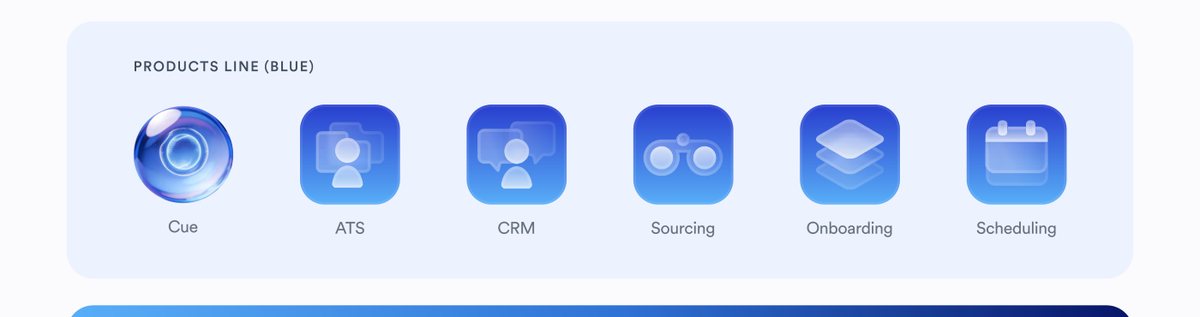
Products line (blue)
Cue · ATS · CRM · Sourcing · Onboarding · Scheduling
Products line (blue) — the icon row from the Cue Guidelines board

Blue with a slight gradient — --gradient-app-icon, glyph knocked out in white at low opacity. Cue keeps its glass sphere; it is never flattened into a blue tile with the rest.
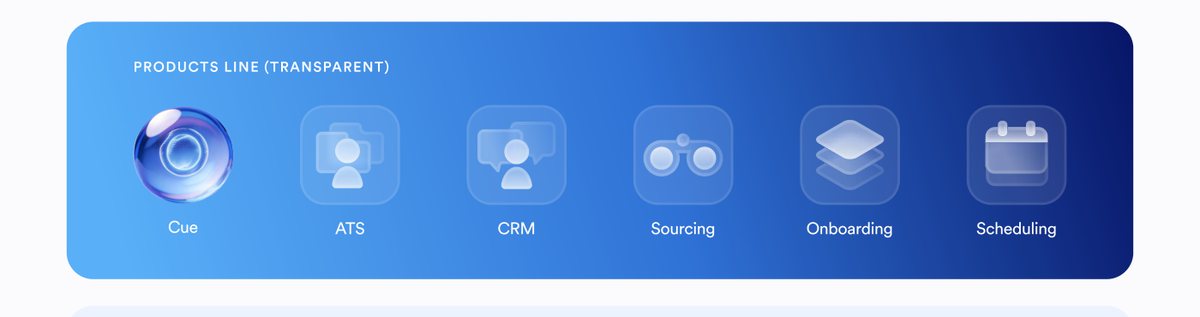
Products line (transparent)
Cue · ATS · CRM · Sourcing · Onboarding · Scheduling
Products line (transparent) — the icon row from the Cue Guidelines board

The same six glyphs on a transparent tile, for placement over artwork or a light ground where a solid blue square would punch a hole in the layout.
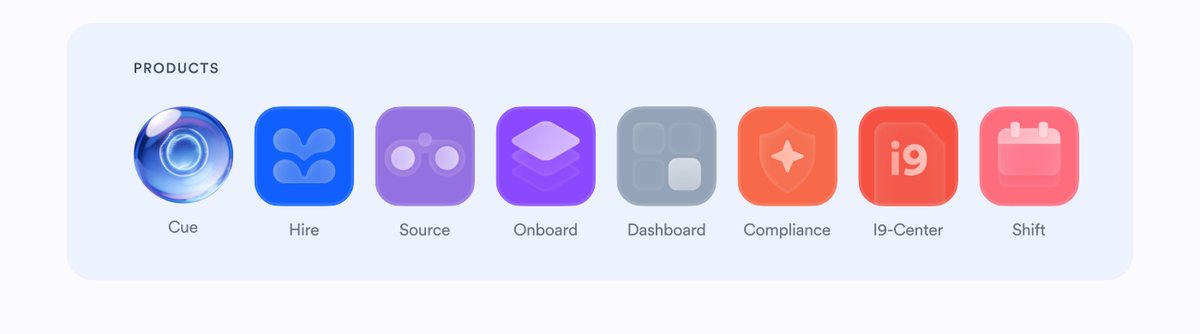
Products
Cue · Hire · Source · Onboard · Dashboard · Compliance · I9-Center · Shift
Products — the icon row from the Cue Guidelines board

Shipped products are colour icons — each one carries its own hue, so a row of them reads as a suite rather than a gradient. Cue leads the row as the glass sphere.

08 — Surface states
Cue · Guidelines, y 2542–3400

A living presence

Icon design. The Intelligence stands apart through a distinct visual treatment. It is more luminous and skeuomorphic than the surrounding apps, creating an immediate visual hierarchy. Its signature is a deep intelligence blue with rich gradients and soft refraction.

Animation. The Intelligence is always in motion. Animations are soft, subtle, but clearly visible, expressing constant activity, quiet power, and calm vigilance.
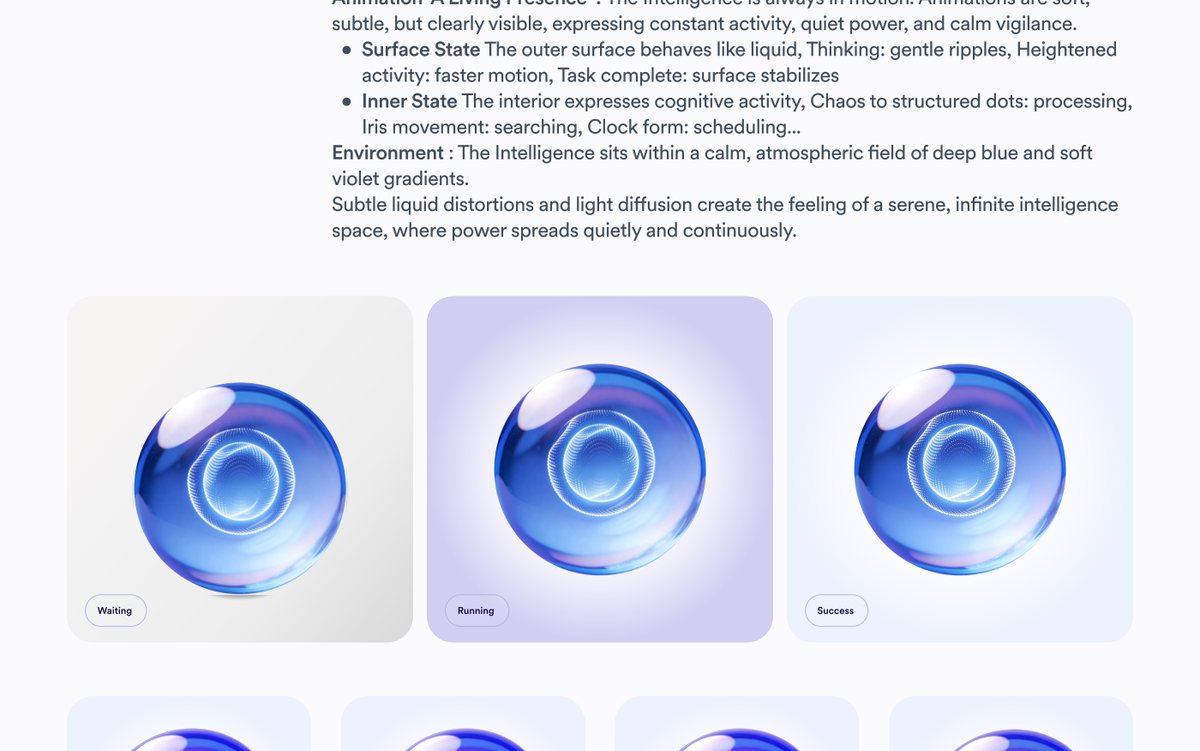
Surface state
The outer surface behaves like liquid. Thinking: gentle ripples. Heightened activity: faster motion. Task complete: surface stabilizes.
Inner state
The interior expresses cognitive activity. Chaos to structured dots: processing. Iris movement: searching. Clock form: scheduling.
Environment
The Intelligence sits within a calm, atmospheric field of deep blue and soft violet gradients. Subtle liquid distortions and light diffusion create the feeling of a serene, infinite intelligence space, where power spreads quietly and continuously.
Waiting, Running and Success states of the Cue sphere
Waiting · Running · Success. The sphere itself barely changes — what changes is the field behind it and the state of the surface. Waiting sits on a neutral warm grey and is still. Running lifts into violet, the interior vortex tightening. Success settles onto the palest blue with the surface stabilised. Read the state off the field, not off a badge.
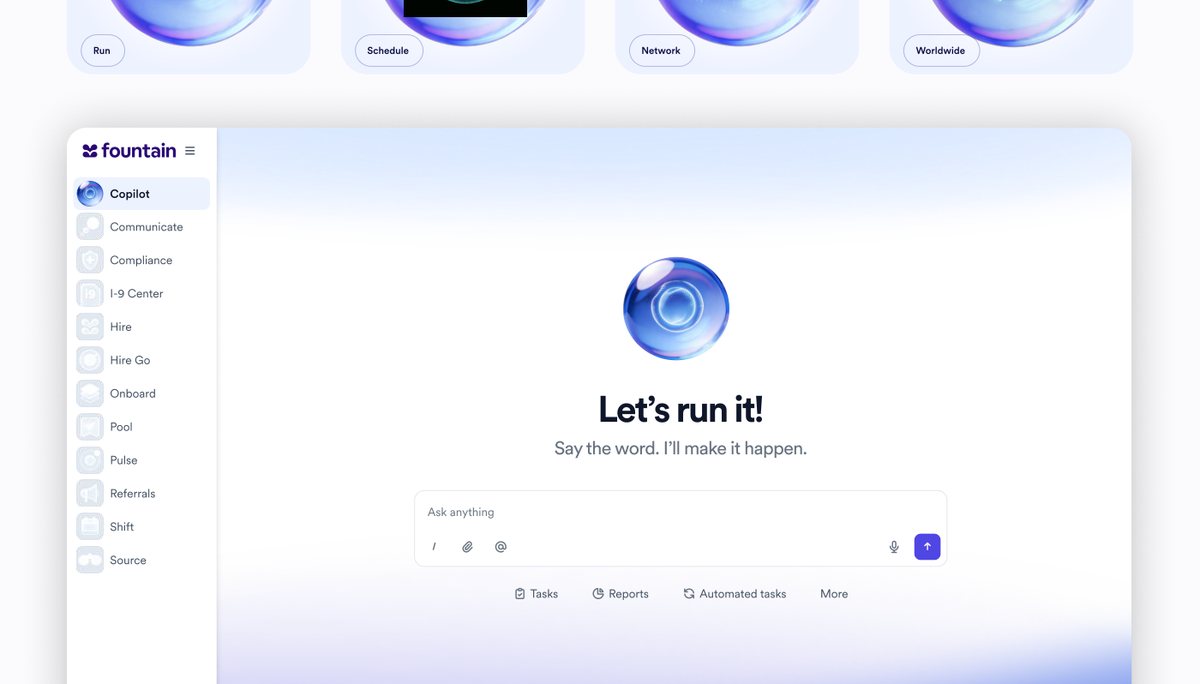
The Copilot empty state: the Cue sphere centred above the prompt field, with the flat product nav down the left
The same rule inside the app, and the clearest example of it. Every product in the left nav — Communicate, Compliance, I-9 Center, Hire, Onboard, Pool, Pulse, Referrals, Shift, Source — is a flat monochrome tile. Only Copilot carries the sphere, and the empty state puts it at the centre above “Let’s run it!” and “Say the word. I’ll make it happen.”, over a plain Ask anything field. The Intelligence is the only luminous, skeuomorphic thing on the screen.
09 — Photography
Cue · Guidelines, y 18172

Human first. Profession is context.

Nine rules, and they are all pulling in the same direction: a real person, caught mid-thought, in daylight, doing a job that is visible at the edges of the frame rather than at the centre of it. If a shot could be a stock photo of an occupation, it is wrong.
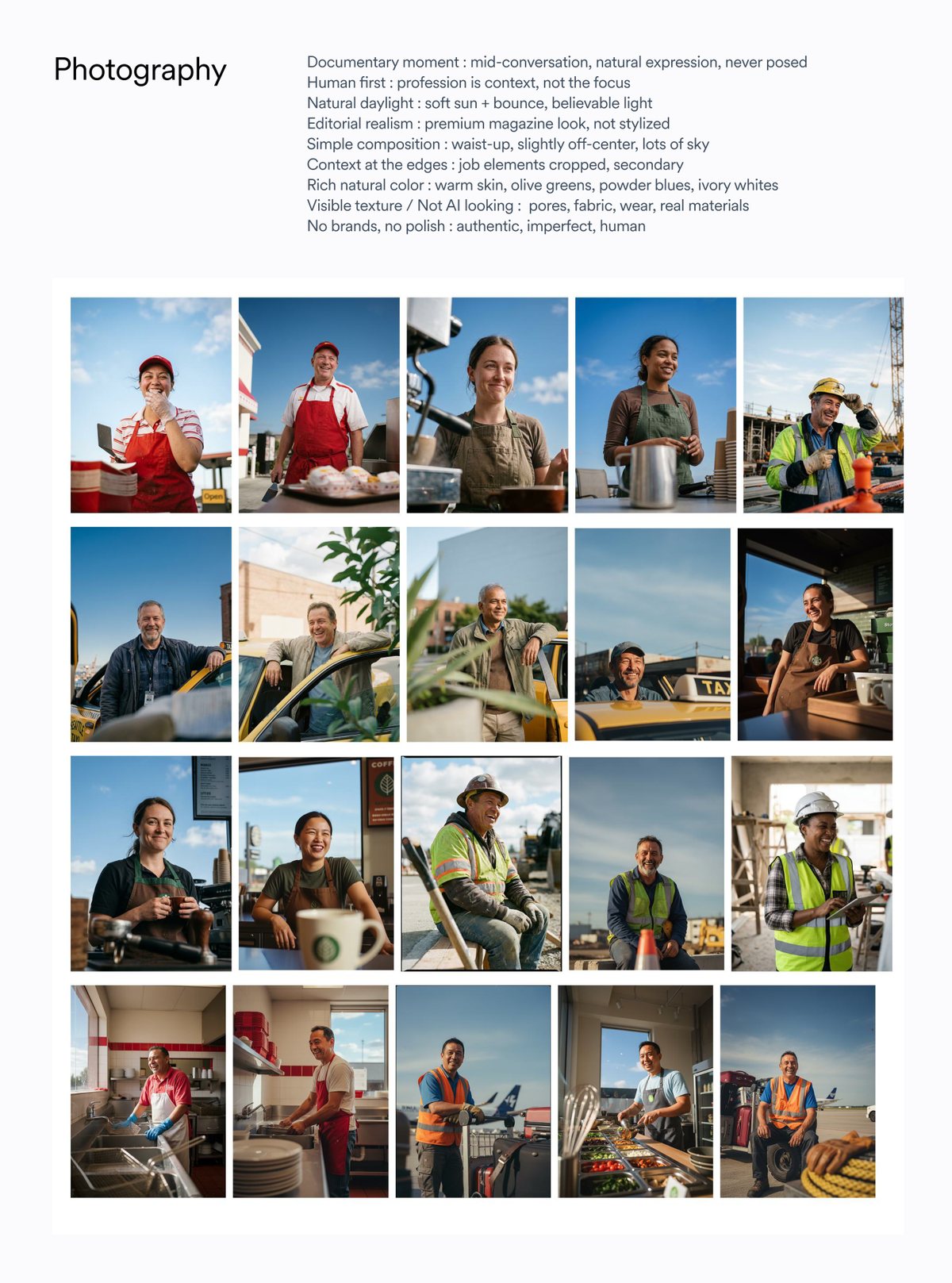
Documentary moment
mid-conversation, natural expression, never posed
Human first
profession is context, not the focus
Natural daylight
soft sun + bounce, believable light
Editorial realism
premium magazine look, not stylized
Simple composition
waist-up, slightly off-center, lots of sky
Context at the edges
job elements cropped, secondary
Rich natural color
warm skin, olive greens, powder blues, ivory whites
Visible texture / Not AI looking
pores, fabric, wear, real materials
No brands, no polish
authentic, imperfect, human
Twenty portraits of frontline workers in natural daylight
The direction board’s own reference grid. Note what is consistent across twenty frames: waist-up, slightly off-centre, a lot of sky, and every subject mid-expression rather than presenting to camera.
10 — The campaign
Cue · Guidelines, y 11758 & 16248

Humans in motion. System in control.

The photography shows the human reality of work. The graphic layer represents the AI system operating in transparency, quietly stabilizing operations. Workers are visually seen through the system, as if the camera sits inside a subtle water sphere: reality is visible, but gently refracted.

Photography overlay
Gentle optical/glass ripple across the frame.
Headline background
Soft blurred gradient panel behind text, colors sampled from the photo (warm reds, ambers, neutrals); ripple distortion must remain subtle and atmospheric, never distracting.
Headlines / Titles
CircularXX white Body headline, bold for the tagline “Run it”; keep high contrast, readability first.
Brand
Fountain logo small and quiet.
The “Run it.” formula
01
The disruption
One short sentence, past tense, stated flatly. “A contractor dropped.” · “Two baristas called out.” · “Weekend surge hit early.”
02
The outcome
One short sentence, past tense, understated — the system’s work, never boasted about. “The schedule held.” · “The line didn’t grow.” · “Drivers were screened.”
03
Run it.
The tagline, set bold in the same size as the two lines above it. It is the third line of the headline, not a separate lockup, and it never changes.
04
The pill
HR Superintelligence in a small glass pill — top-left on a photo-led frame, above the headline on a panel-led one.
05
The logo
The Fountain wordmark, small and quiet, anchored at the bottom. It is the last thing you read.
Set from the tokens
HR Superintelligence

A contractor dropped.
The schedule held.
Run it.

Fountain

Panel is --gradient-panel-blue, pill is --glass-solid over --glass-blur, headline is --h4-sm/--lh-tight at 400 with the tagline at 700. On a real asset the panel colour is sampled from the photograph instead — see the grades below.

Colour grading, per ICP — sampled from the photograph, never a fixed brand colour
Aviation & ground handling
Hi-vis orange and powder blue, graded off the tarmac and the sky behind it.
Quick-service food
The deep reds of the apron and the counter, pushed warm.
Coffee & retail
Olive green through roasted browns — the darkest, quietest grade of the set.
Logistics & delivery
Violet lifted straight out of the hi-vis vest and the van livery.

This is the one place the brand palette steps back. The headline panel takes its colours from the frame it sits under — warm reds, ambers, neutrals — so the graphic layer reads as the photograph refracted rather than a blue box laid on top of it. The blue system returns for the pill, the wordmark and everything digital.
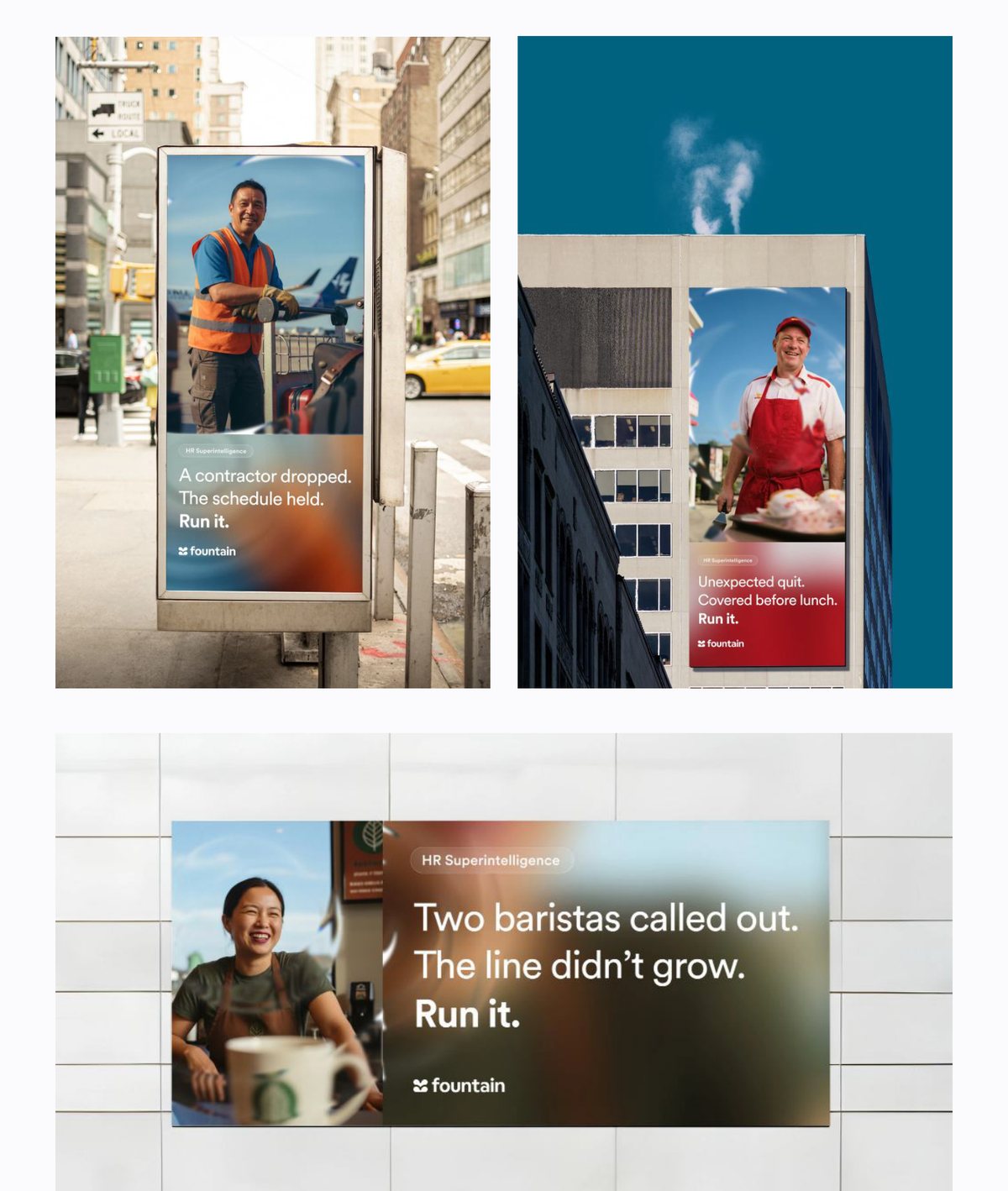
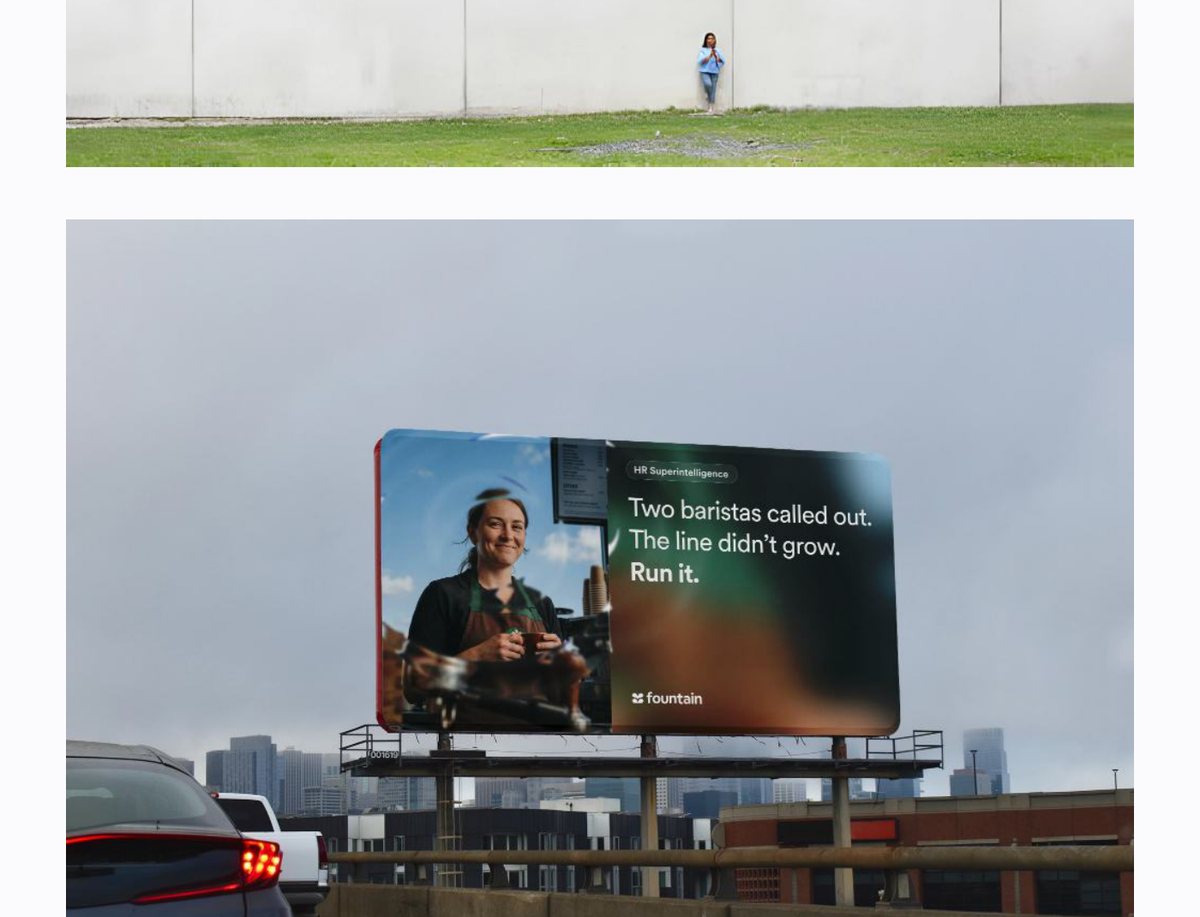
Formats
Street furniture & wallscape
Portrait. Photograph fills the top two-thirds, the blurred gradient panel rises from the bottom edge and carries the three-line headline, pill top-left, wordmark under the type.
Billboard
Landscape, split down the middle: photograph left, headline panel right. The ripple crosses the seam so the two halves read as one refracted frame.
Social — a three-card sequence
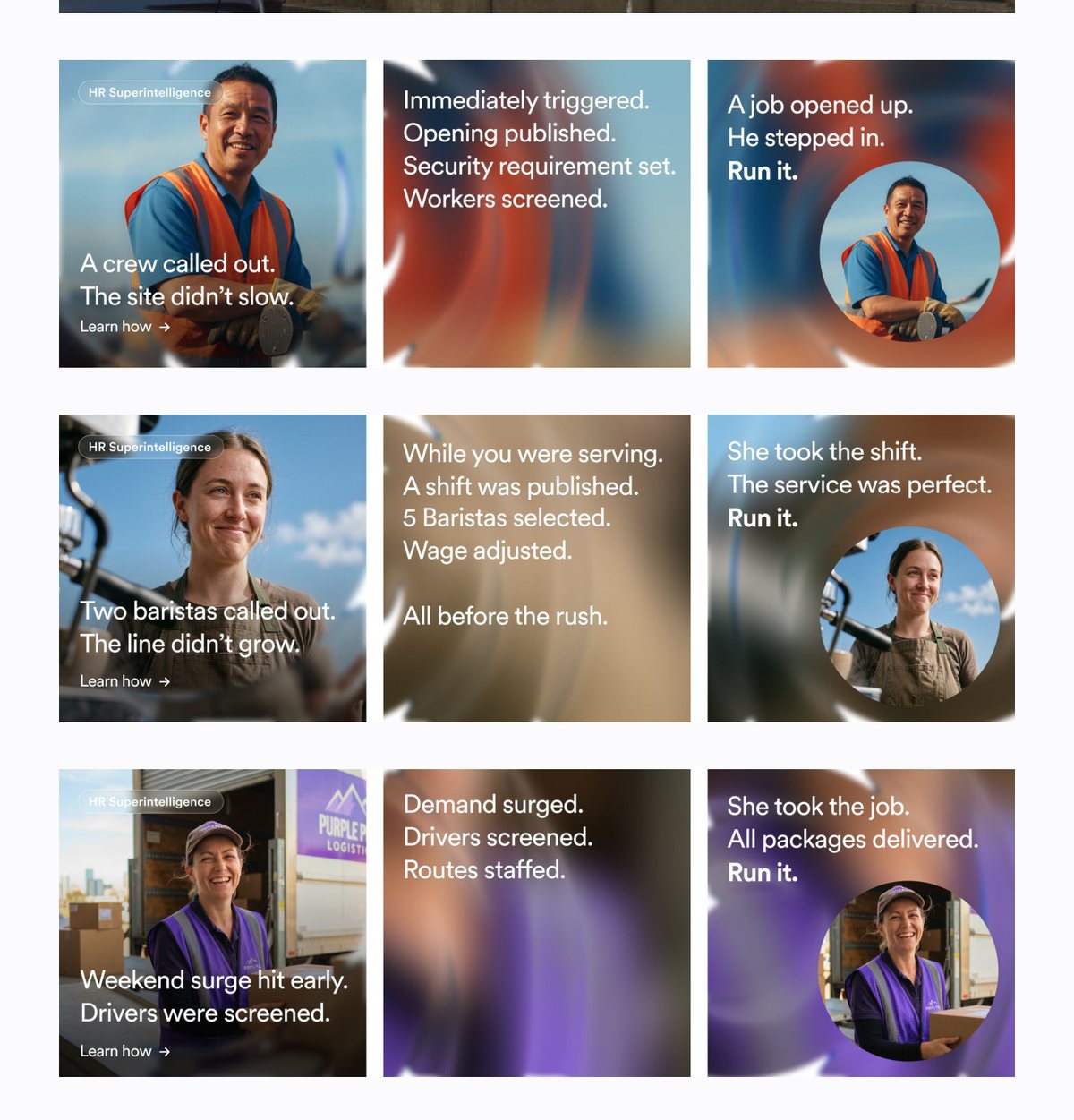
Card 1: portrait, the disruption, “Learn how →”. Card 2: no photograph at all — the pure ripple field, carrying what the system did, step by step. Card 3: the outcome, “Run it.”, and the same person returning inside a circular refracted cut-out.
Street furniture and wallscape mockups of the Run it. campaign
Street furniture and wallscape. Three ICPs, three grades — amber, red, warm neutral — one headline structure.
Roadside billboard mockup of the Run it. campaign
Billboard. Photograph left, panel right, the ripple carried across the seam.
Nine social cards: three ICP sequences of situation, system, outcome
Social, read left to right: situation → system → outcome. The middle card is the only place in the whole system where the ripple field appears on its own, with no photograph and no sphere — it is the system working, and you are inside it.

Before you ship

Nine things to check

The sphere
Calm and stable. Transparent liquid glass, strong refraction, soft iridescent highlights, a luminous particle core. Never aggressive or mechanical.
The mark
Free-standing, unboxed, no background, no radius of its own, bloom intact — or .fx-orb--flat if the surface already glows.
Hierarchy
The Intelligence is the most luminous thing in the frame. If a product icon is competing with it, the frame is wrong.
Colour
Indigo for AI affordances, deep blue for the field, one semantic accent at most. No raw hex where a token exists.
Type
Left aligned. Editorial scale. Bold only on the tagline. Readability first.
Elevation
Rings and glow, not grey drop shadows. --shadow-bloom belongs to the mark alone.
Photography
Documentary, daylight, waist-up, off-centre, visible texture. No brands, no polish.
The refraction
Gentle. Atmospheric. If the ripple is the first thing you notice, turn it down.
The wordmark
Small, quiet, anchored at the bottom. Last thing read.